AI tool
1 creditAI Image Editor
Open any photo of your product and change it. Pick one of nine professional settings and the editor puts your product into it, or describe the change you want in plain words. Run the same change across four photos at once, compare versions side by side, and go back to any of them. Your product keeps its shape, colour and detail throughout.
How it works
- Add any photo you have A product photo from your phone, or one you made here earlier. Uploading is free, and nothing is generated until you ask for it.
- Change it, two ways Pick one of the nine settings and the editor puts your product into it, or describe the change you want in plain words. Either way the product keeps its shape, colour and detail. Each change costs 1 credit.
- Keep what you like Every version is saved to its own project, so you can compare two of them, go back to an earlier one, or run the same change across four photos at once.
One photo, every setting
Worked examples
Every picture below is the same product photo, put into a professional setting with the studio. Your product keeps its shape, colour and detail; only what is around it changes. Pick a setting to load it into the studio - nothing runs, and nothing is charged, until you press the button yourself.
-
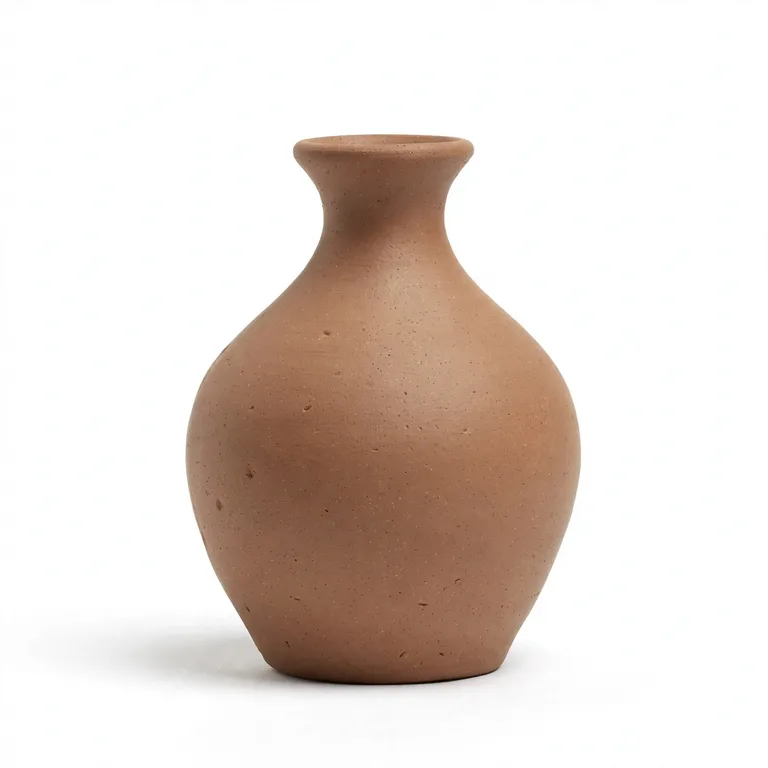 Your photo
-
The safe listing photo. Works for anything.
-
A calm colour behind the product, no props.
-
Bathroom, skincare and self-care products.
-
Food, drink, ceramics and homeware.
-
Textiles, candles and cosy gifts.
-
Minimal, modern, higher price points.
-
Jewellery, glassware and premium packaging.
-
Hampers, wrapping and celebration sets.
What you can change
-
A setting, one click
A clean white studio, a marble counter, a kitchen table, linen, a dark spotlight. Nine of them, each with a picture of what it looks like, and the product is kept exactly as you photographed it.
-
A change in plain words
Say what you want different and the editor works from your words: warmer light, a plainer background, the same shot from a little further back.
-
Four photos, one change
Open the batch section, tick the photos in the project, and run the same change across up to four of them at once.
-
Every version kept
Each result is a version you can go back to. It is how you compare two ideas without losing the one you already liked.
Your image
Loading your projects…
Add a photo of your product and everything here works from it - put it in a scene, refine it, keep every version.
or describe an image below and the studio makes one
Your images
Building a listing set?
The studio plans the shots a listing needs from one photo and makes the whole set at once, with the listing text if you want it.
Open the AI Image StudioNew image
New image
A suggested edit is ready — generate or upload an image, then you can use it.
A credit is one unit of spend. Creating an image costs 1 credit, changing one costs 1 credit - the same price - and uploading your own photo is free. New accounts start with 20 free credits. Get credits
Edit the image
Put it in a scene
Start from
Pick one and it fills the box above - tweak it, then press Make this change.
Set the scene on several images
Tick the photos, describe the setting in the box above, and the button below puts them all in it. 1 credit per image.
Add photos to this project first.
Your projects
No saved projects yet. Make an image and it shows up here.
Couldn't load your projects.
AI Image Editor: questions
What does the AI Image Editor cost?
Every change costs 1 credit. Uploading a photo and looking at the settings is free, so you can see what it does before you spend anything.
What can I edit?
A photo of a product: any JPEG, PNG or WebP up to 5 MB. The studio keeps the product itself the same and changes what is around it. If you want a whole set of listing images planned from one photo, that is the AI Image Studio.
Will it change the product itself?
No. The change is applied to the setting around your product, and the guard the editor sends says so: keep the product itself exactly the same, and only change the background and scene. If the product comes back looking different from what you photographed, that is a bad result rather than the intent.
Can I use the same change on several photos?
Yes. The batch section takes up to four photos from the project and runs one change across them, at 1 credit each.
Can I go back to an earlier version?
Every version is kept in the project, with the original photo first. Compare two of them side by side, or open an earlier one and carry on from there.
Where can I use the pictures?
Anywhere you need a product photo: a shop listing, your own site, a market stall sign, a flyer or a post. They are yours, and nothing is watermarked.
More tools you can use
Moss Toolbox
Need more credits?
- 100 credits $4
- 300 credits $8 Most popular
- 750 credits $15
- ✓Credits never expire
- ✓One balance works on every tool
- ✓No subscription, nothing renews
Most tools cost 1 credit each time. AI Image Studio costs 1 credits per image, whether you create it or change it.
Get credits